How to Withdraw Money from ExpertOption in 2026: Withdrawal Methods, Fees & Processing Time

In this guide, you'll learn how to withdraw money from your ExpertOption account, explore the available withdrawal methods, and understand the fees, verification requirements, and processing times involved so you can receive your funds smoothly and confidently.

ExpertOption Withdrawal Guide: How to Cash Out Your Trading Profits Safely and Quickly
You Have Earned It — Now Let’s Get It Out
Making profitable trades on ExpertOption is only half the journey. Knowing how to withdraw your earnings quickly, safely, and without unnecessary complications is just as important. Whether you are cashing out for the first time or looking for the fastest way to access your funds, this guide walks you through everything you need to know about the ExpertOption withdrawal process from start to finish.
ExpertOption Withdrawal — Key Facts at a Glance
| Detail | Information |
|---|---|
| Minimum Withdrawal | $10 |
| Platform Withdrawal Fee | 0% |
| Processing Time | Up to 2 business days |
| Supported Methods | Bank Card, E-Wallet, Skrill, Neteller, WebMoney, Qiwi |
| KYC Verification Required | Yes — for certain amounts |
| Withdrawal to Same Method | Required for original deposit amount |
| Available 24/7 | Yes — requests submitted anytime |
What You Need Before Withdrawing
Before submitting your first withdrawal request, make sure the following are in order to avoid any delays:
- An active and funded ExpertOption trading account
- A verified email address on your account
- Completed KYC identity verification
- A withdrawal method linked to your account
- A minimum balance of $10 available for withdrawal
- A stable internet connection on your device
Not registered yet? Create Your Free ExpertOption Account
Withdrawal Methods Available on ExpertOption
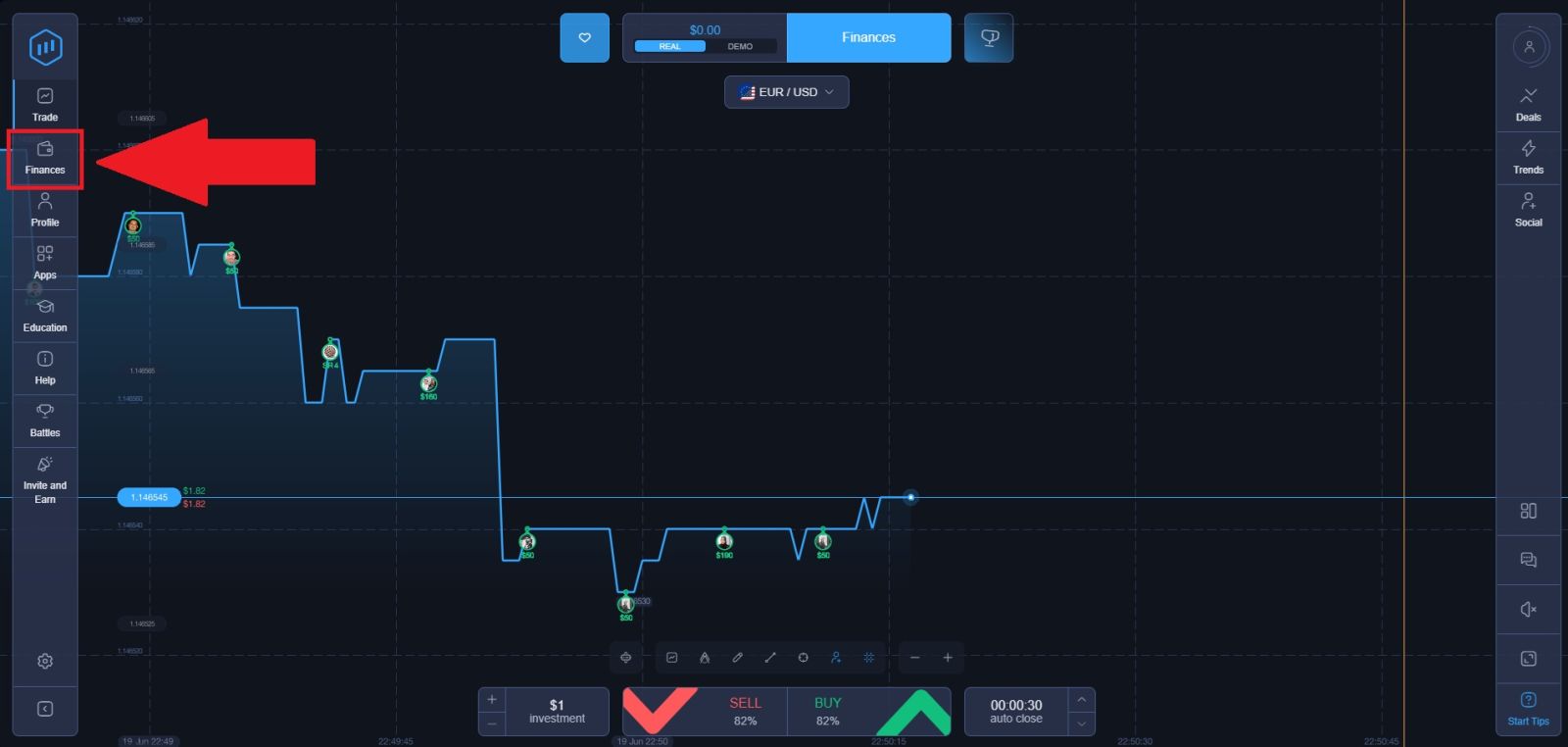
ExpertOption offers a range of withdrawal options to suit traders from different regions and with different financial preferences. To see all available options for your specific country, open the platform and tap the Finances button in the main navigation menu.
-
Bank Card (Visa / Mastercard)
Withdrawals back to your original deposit card are the most straightforward option. The amount you can withdraw to your bank card is capped at the total amount you originally deposited using that card. Any profits earned beyond your deposited amount need to be withdrawn through an alternative method of your choice.
-
Digital Wallets
ExpertOption supports withdrawals to several popular electronic wallet platforms, giving you flexibility in how you access your funds:
- Skrill — Fast and widely available across multiple regions
- Neteller — Popular among online traders for its speed and low fees
- WebMoney — A reliable option for traders in Eastern Europe and Asia
- Qiwi — Available for traders in supported regions
E-wallet withdrawals are generally faster to process and more flexible than bank card withdrawals, making them a preferred choice for active traders who cash out regularly.
-
Other Available Methods
Depending on your country and account settings, additional withdrawal options may appear in your Finances section. These can include local payment systems and regional transfer methods tailored to your location.
Understanding ExpertOption Withdrawal Rules
Same Method Policy
ExpertOption follows a standard financial security policy requiring that withdrawals be sent back to the same payment method used for your original deposit. This means:
- If you deposited via Visa card, your withdrawal up to the deposited amount must go back to that same Visa card
- If you deposited via Skrill, your withdrawal up to the deposited amount must return to that Skrill account
- Profits earned beyond your deposited amount can be withdrawn to any available method of your choice
This policy exists to prevent money laundering and protect the security of your account.
Withdrawal Limits
- Minimum withdrawal: $10 — allowing you to cash out even small earnings without waiting to accumulate a larger balance
- Maximum withdrawal to original card: Capped at the total deposited amount via that method
- Profits: Can be withdrawn via any supported method with no fixed cap
Withdrawal Fees on ExpertOption
ExpertOption does not charge any platform-side fees when you withdraw your funds. This means the full amount you request will be sent to your chosen payment method without any deductions from the platform itself.
However, it is important to be aware that:
- Your bank or card issuer may apply a receiving fee or currency conversion charge
- E-wallet providers such as Skrill or Neteller may charge their own processing percentage
- Payment system commissions vary by provider and are outside ExpertOption’s control
Always check with your specific payment provider to understand any fees that may apply on their end before submitting a withdrawal request.
How Long Do ExpertOption Withdrawals Take?
ExpertOption strives to process all withdrawal requests as quickly as possible. Here is what to expect:
- Standard processing time: Up to 2 business days from the moment your request is submitted
- E-wallet withdrawals are typically faster than bank card withdrawals once processed
- Weekends and public holidays may extend processing times slightly, as these are not counted as business days
- First-time withdrawals may take slightly longer due to identity verification requirements
Once ExpertOption processes your withdrawal on their end, the time it takes for funds to appear in your account depends on your payment provider.
How to Withdraw Money from ExpertOption — Step-by-Step Guide
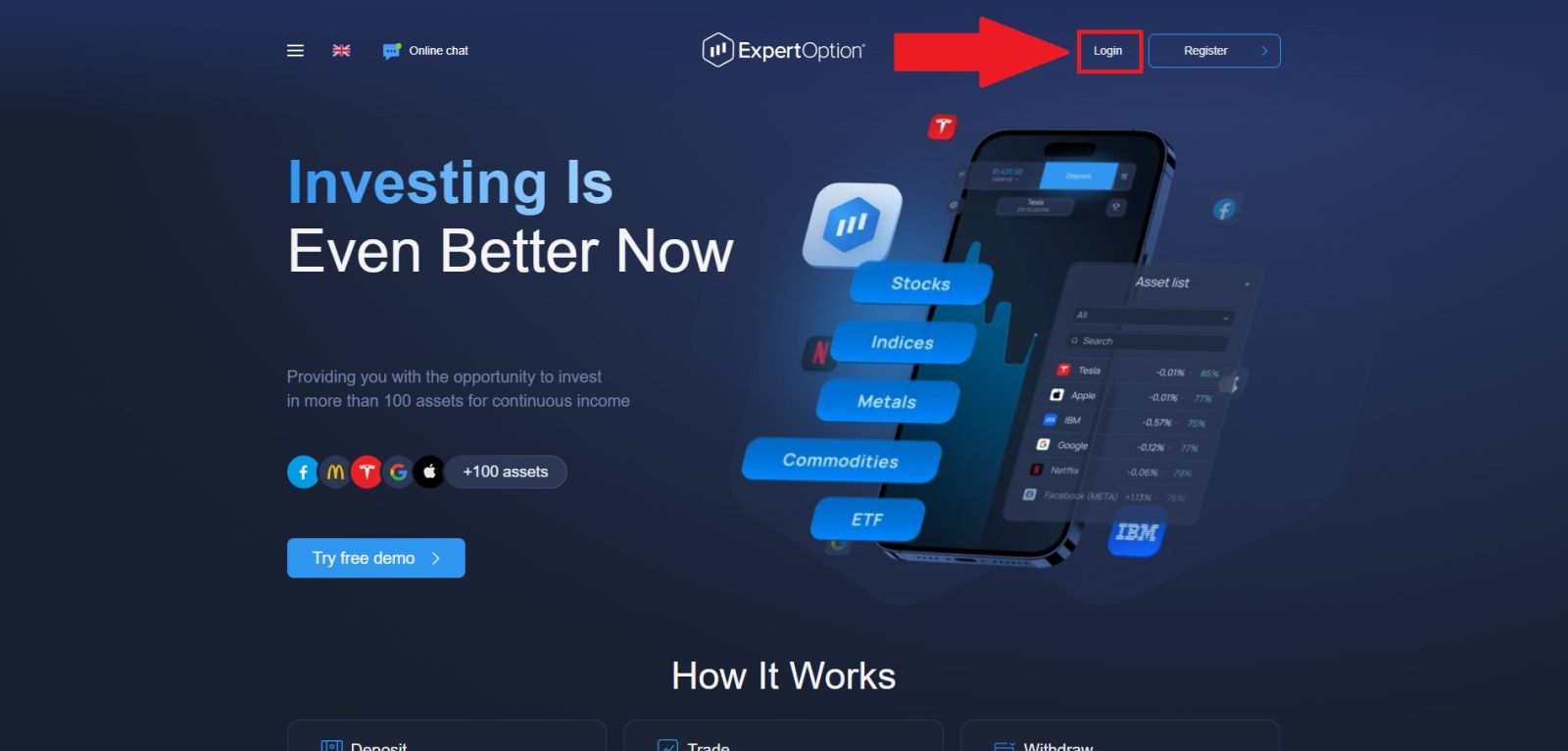
Step 1: Log In to Your ExpertOption Account
Open your browser and head to the official ExpertOption website. Before entering any details, confirm the URL is correct and check for the padlock icon in the address bar to ensure the connection is secure — this protects you from fake login pages designed to steal your credentials.
Click "Login" and enter your registered email address and password. If you signed up via Google, Facebook, or Apple, use the corresponding social login button instead. Once authenticated, you will be directed to your trading dashboard, where you can proceed with your withdrawal.
Step 2: Navigate to the Withdrawal Page
Once you are inside your dashboard, locate the "Finances" button on the left side of the screen and click it. This will open your financial management panel where you can handle all account transactions.
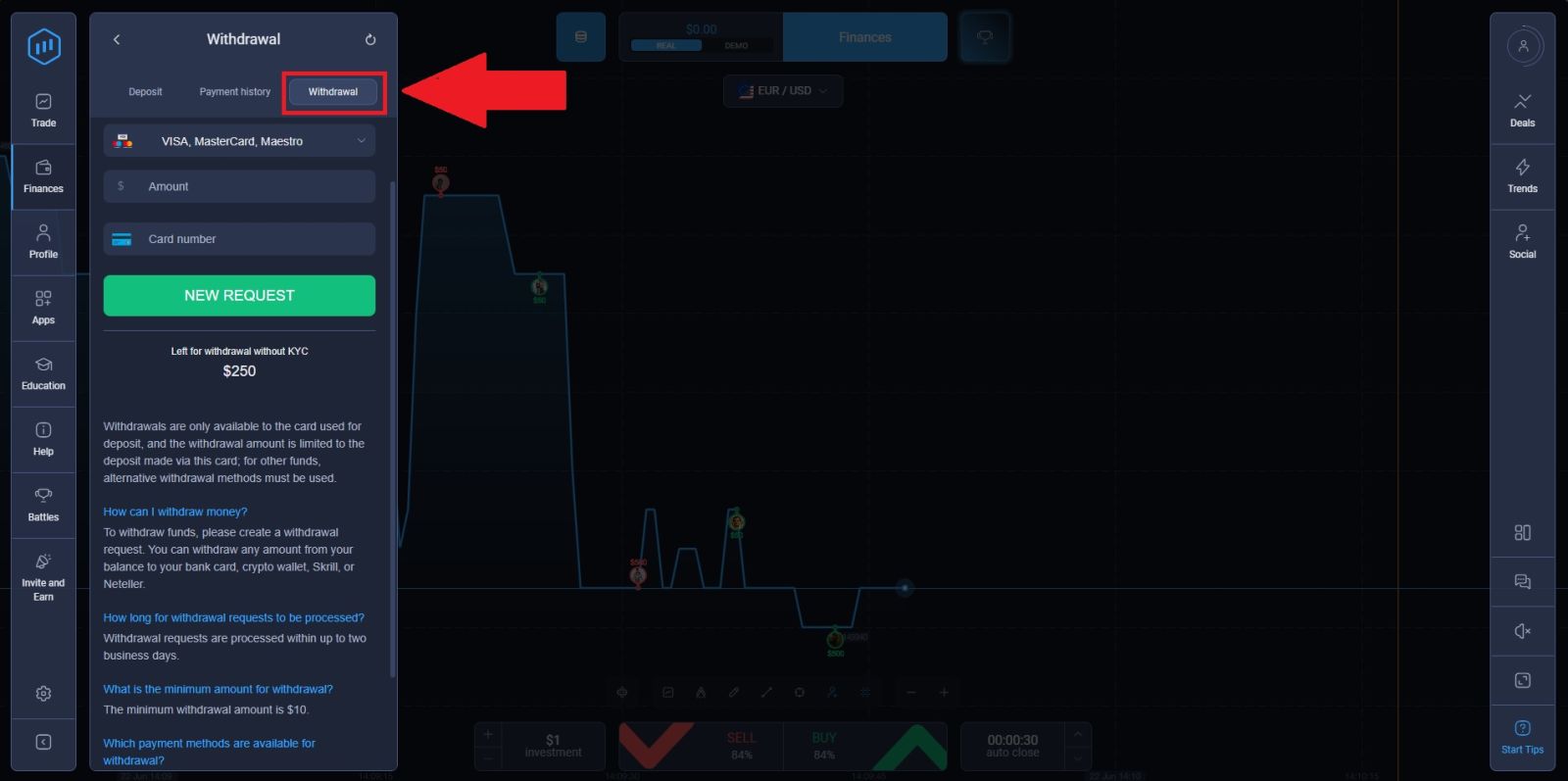
From there, click on the "Withdrawal" tab to access the cashout page, where all available withdrawal methods for your region will be displayed. Browse through the options and select the method that best suits your needs to proceed.
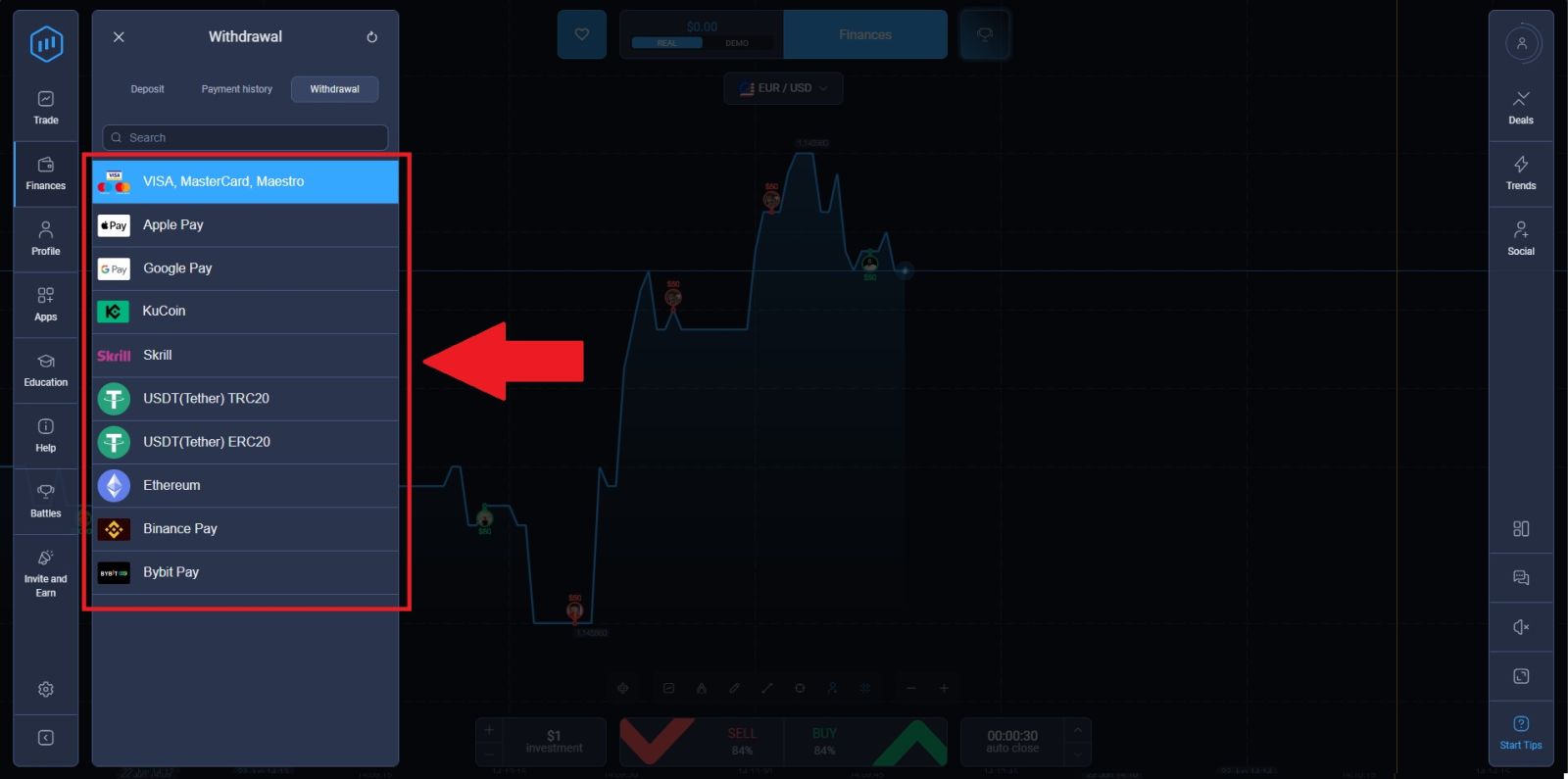
Step 3: Choose Your Withdrawal Method
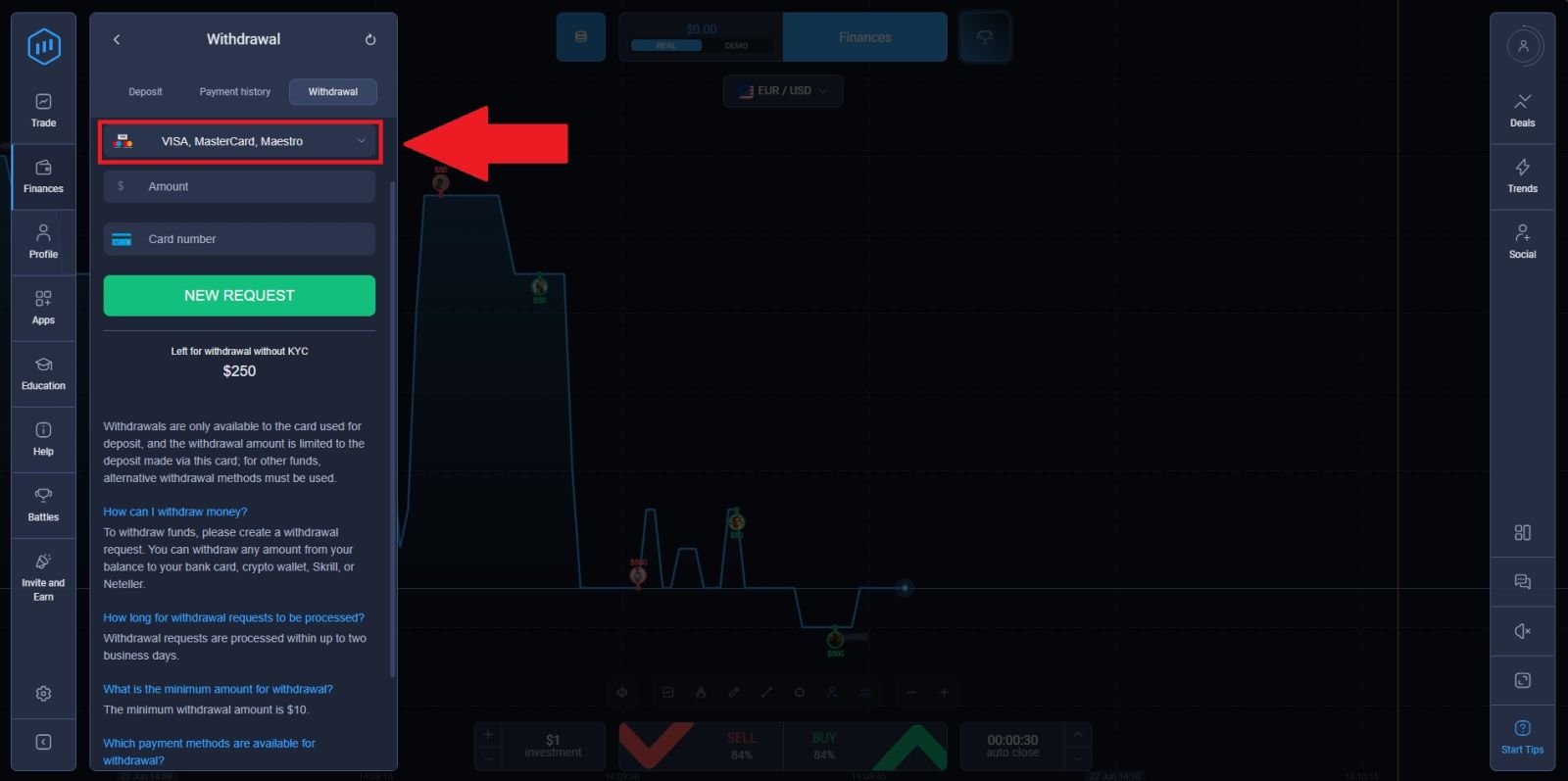
Browse the available withdrawal options and select the method you wish to use. Keep in mind the same-method policy — if you are withdrawing an amount up to your total deposited sum, it must be sent back to the original payment method used for your deposit.
For withdrawing profits above your deposited amount, choose any available method that suits your preference and location. (Here, we’re choosing USDT/TRC-20 as an example)
Step 4: Enter Your Withdrawal Amount and Details
Enter the amount you wish to withdraw into the provided field. Make sure the amount meets the minimum requirement. Then, enter your wallet address to continue.
Review all entered information carefully before proceeding to ensure there are no errors that could delay your withdrawal, then click on [NEW REQUEST] to complete the withdrawal.
You will receive a confirmation notification informing you that your withdrawal request has been received and is being processed. You can track the status of your request at any time through the Payment History tab in your Finances section.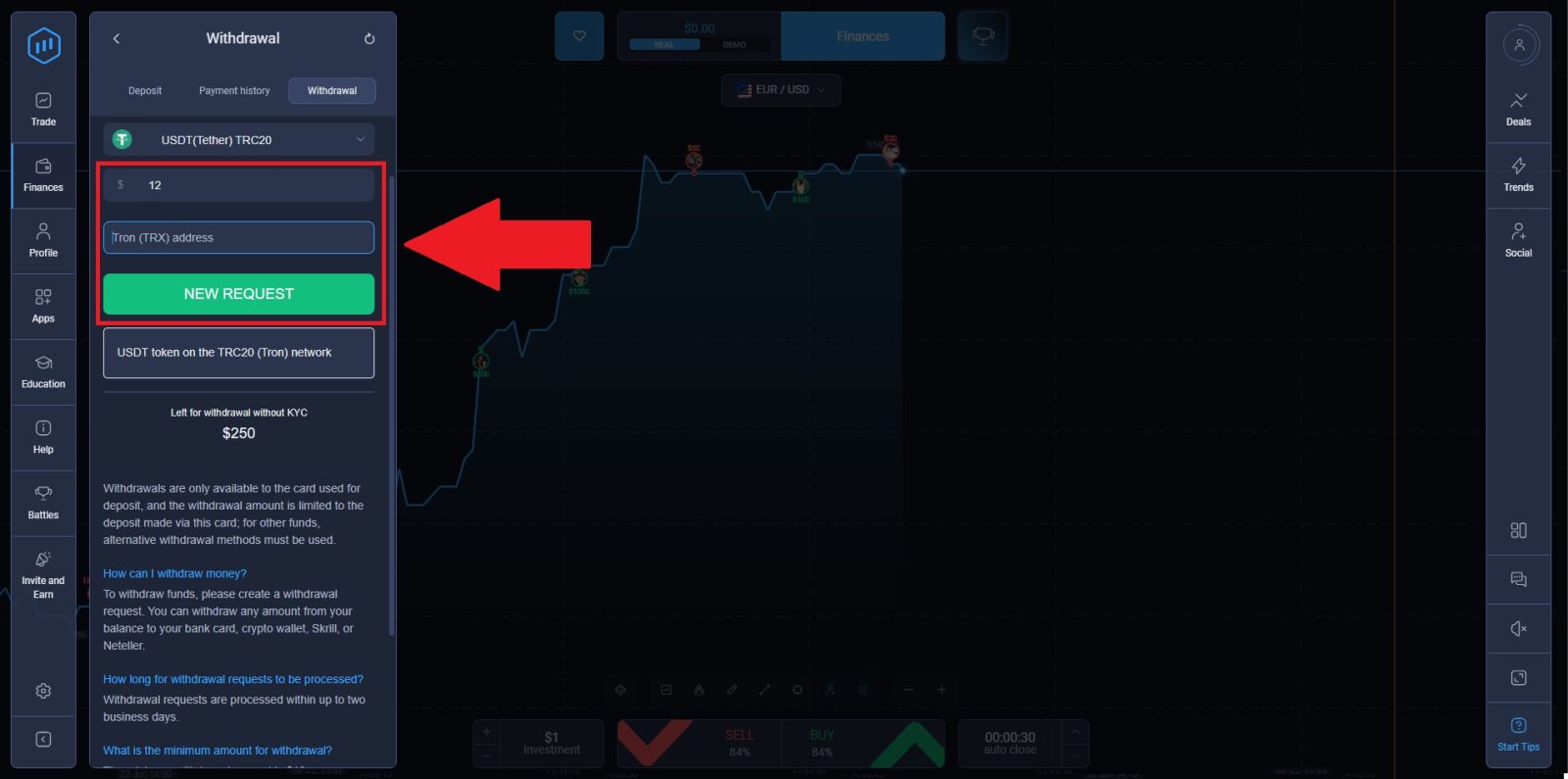
Common ExpertOption Withdrawal Issues and How to Fix Them
Even with a straightforward process, withdrawal issues can occasionally arise. Here are the most common problems and their solutions:
- Withdrawal request is pending for more than 2 business days
Check that your KYC verification is fully completed and approved. Unverified accounts are the most common reason for delayed withdrawals. Contact ExpertOption support if the delay extends beyond the standard processing window.
- Withdrawal rejected or cancelled
This usually happens when account details do not match, verification documents were not accepted, or the withdrawal method does not match the original deposit method. Review the reason provided in your account notification and resubmit with the correct information.
- Amount less than expected received
Your payment provider may have deducted their own processing fee from the transfer. ExpertOption itself does not deduct any amount, so any difference is attributable to third-party charges from your bank or e-wallet provider.
- Cannot find the withdrawal option
Make sure you are navigating to the correct section — tap Finances in the main menu, then select the Withdrawal tab. If the option is not visible, your account may need to complete verification before withdrawal access is unlocked.
Key Things to Remember About ExpertOption Withdrawals
- ExpertOption charges zero platform fees on all withdrawals
- The minimum withdrawal amount is $10 — you can cash out even small profits
- Withdrawals are processed within up to 2 business days
- You must withdraw back to your original deposit method up to the deposited amount
- Profits can be withdrawn via any available method of your choice
- KYC verification may be required for certain withdrawal amounts — complete it early
- Weekends and holidays are not counted as business days for processing purposes
What to Do After Your Withdrawal Is Processed
Once your withdrawal has been successfully processed, here is what to keep in mind:
- Check your payment method for the incoming funds — arrival time depends on your provider
- Review your remaining balance on ExpertOption to plan your next trades
- Keep your account active — regular trading activity keeps your account in good standing
- Reinvest a portion of your profits — experienced traders often keep a portion of earnings in their account to continue trading
- Track your withdrawal history in the Payment History tab for your personal records
Ready to add more funds? ExpertOption Deposit Guide
Improve your trading results: ExpertOption Trading Strategy Guide
Conclusion: Withdraw Funds from Your ExpertOption Account Smoothly and Securely
Withdrawing money from your ExpertOption account is a straightforward process when you follow the correct steps and ensure your account is fully verified. By choosing a supported withdrawal method and understanding the applicable fees and processing times, you can manage your funds more efficiently and avoid unnecessary delays.
Providing accurate payment details and complying with verification requirements helps ensure a smooth payout experience. With a secure withdrawal system and reliable processing, ExpertOption allows traders to access their profits with confidence.